- $USD
- English (United States)
- Hire an Expert
- Get Support



- Blog
- How to Redirect Users After Login or Registration in WooCommerce?
How to Redirect Users After Login or Registration in WooCommerce?
Ever wanted to send users exactly where you want right after they log in or sign up on your WooCommerce store? WordPress doesn't let you do that by default, so it might feel like there’s no way around it. But that’s not true.
With the WooCommerce login redirect plugin, you can set up specific redirects without needing to mess with code. You can guide customers, vendors, or even certain users by name straight to the pages that matter most. It’s a simple way to keep things organized and make sure users land where they’re supposed to instead of the usual My Account page. You get better flow and more control over how people move through your store.
Why Redirecting After Login Matters in WooCommerce
Setting up login redirects in WooCommerce ain't just a nice feature — it’s something every store owner should think about. It lets you send customers where it actually makes sense, instead of always dumping them on that same old My Account page.
Take charge of where people go: With the WooCommerce login redirect plugin, you decide what page users land on. You don’t gotta settle for default pages — you can push them to your shop, a custom offer, or anywhere you think fits.
Get users to land where you want: Maybe it’s a sales page or a personalized dashboard. You can set that up so they go there right after login or registration. It saves them time and helps you guide them straight.
How to Redirect to Another Page After Login in WooCommerce
If you want users to land somewhere useful after login, like your main shop page or custom dashboard, the WooCommerce login redirect plugin by Extendons makes that possible without dealing with code or third-party tools. For a shorter and to-the-point guide, visit the WooCommerce redirect after login documentation page.
Step 1: Install the Plugin
Go to your WordPress dashboard. Click on Plugins > Add New, upload the ZIP file of the plugin you got after the WooCommerce login redirect download, and hit Install then Activate. That’s it — plugin is ready.
Step 2: Create a Redirection Rule
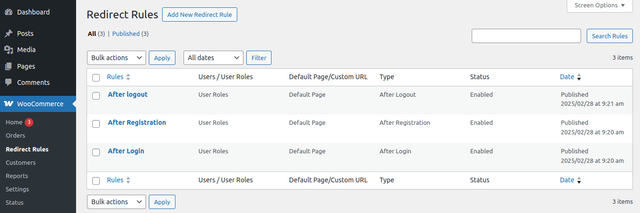
Head to WooCommerce > Redirect Rules. Click Add New to make your first rule. Give it a name — something simple like “Customer Login Redirect.”
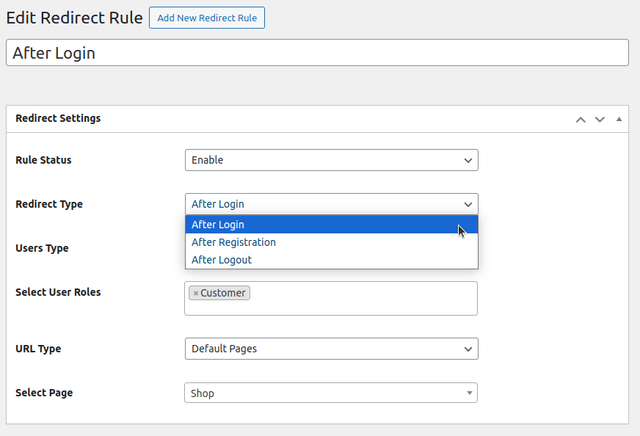
Pick the action type — login, logout, or registration. Then choose who it applies to. You can redirect all users, or maybe just customers, or even someone specific by username. That gives you full control.
Now choose where they go — a default WooCommerce page like “Shop” or “Cart,” or even a custom URL like “https://yourdomain.com/dashboard”
Step 3: Add Rules for Registration and Logout
Not just login — you can set up WooCommerce registration redirect and WooCommerce logout redirect too. Send new signups to a welcome page or a special offer.
Logout? Send them back to the homepage or wherever you want.
Step 4: Add More Rules if Needed
You can stack up rules — create one for customers, one for subscribers, another for VIP users. The plugin sorts out the right one based on your setup. Keep things simple or go specific. Your call.
Step 5: Test Your Setup
Login with a test account and see where it lands. Try different roles and see if the rules work. That’s the best way to check before pushing it live.
Don’t overdo it. If someone logs in just to check their orders, don’t keep pushing them to your sale page every time. Use redirection smart. Respect their intent, and use WooCommerce login redirect free setup in a way that keeps users from clicking back or leaving.
This plugin don’t mess with WooCommerce admin login URL or any default behavior unless you tell it to. Everything stays stable, and only the front-end redirects change based on what you build.
Top 3 Redirect After Login WooCommerce plugins
Using plugins is a smart way to handle redirects in WooCommerce. Besides the usual ones, here are three great options for redirecting users after login. Let’s check out what they do and why they stand out.
1. Extendons Redirect User After Login And Register

The WooCommerce redirect after login by extendons is a solid choice if you want full control over where your users go after logging in or registering on your WooCommerce store. It lets you set redirects based on user roles, specific users, or even default pages, all without fuss. You can customize URLs easily, test how it works, and decide if redirects happen on login, registration, or logout. It’s straightforward but powerful, no need to mess with code. Perfect for stores wanting to guide users exactly where they need to go.
Main features
- Redirect by user roles or specific users
- Set different URLs for login, registration, logout
- Easy to use with clear options
- Test redirects before finalizing
- Works smoothly with WooCommerce
Pricing: $29
2. Yoast WooCommerce SEO

Yoast WooCommerce SEO is known mostly for SEO but also has redirect functions that help keep your site clean. It helps catch old or broken URLs and set up redirects to avoid 404 errors. You can import and export redirect rules through CSV. It’s good if you want basic redirect management with SEO benefits but might not be as focused just on login redirects.
Main features
- Import and export redirects via CSV
- Handle temporary and permanent redirects
- Support for regular expressions redirects
Pricing: $79
3. LoginWP

LoginWP lets you set redirect rules after login for specific users, user roles, or users with certain capabilities. You can also create a general redirect rule for all other users and set a redirect URL right after registration.
It supports dynamic URL placeholders like {{username}}, {{user_slug}}, and {{website_url}} so the redirects can change based on who logs in.
If you upgrade to LoginWP PRO, you get extra options like redirecting users back to the page they logged in from or the previous page they visited, using {{current_page}} and {{previous_page}} placeholders.
The free version mainly works with the default WordPress login and some simple registration forms. To unlock more features and better integration with other login plugins, you’d need the Pro version.
Main Features
- Redirect users by specific user, role, or capability
- General redirect rule for other users
- Dynamic URLs with placeholders
- Post-registration redirects
- Custom code support for advanced redirects
Price: Free (Pro version available for more features)
Conclusion
To sum up, redirecting users to another page right after login is getting more important for any WooCommerce store. If you want your WooCommerce store to stand out, this is something you gotta consider. These redirects don’t just help with better site control, but also can bring more visitors where you want them—like a special offer or important page.
Besides the redirect plugin, there are many other WooCommerce Plugins To Improve Your Store Conversions out there that you can utilize. It just depends on how well you make use of them!
With the Extendons plugin, setting these redirects is easy and gives you full control over where your customers land after they log in. That means you can guide them exactly how you want, which can help your store do better.
FAQ’s
- How to redirect a user after login?
You can redirect users after login by using a WooCommerce login redirect plugin that sets custom destination pages based on user roles or usernames. This improves store navigation and lets you send users where it matters most instead of the default My Account page. - How to redirect WordPress users after login?
Install the WooCommerce redirect after login plugin and configure rules for each user role to land on specific pages. It's ideal for B2B stores that want more control over user flow after login. - How do I redirect after WP login?
Use a WooCommerce login redirect plugin to automatically send users to product pages, dashboards, or any custom URL post-login. The plugin handles this without any coding needed. - How to redirect to another page when a login button is clicked?
With the WooCommerce login redirect plugin, you can set rules that send users to checkout, cart, or custom landing pages once they click the login button. It's perfect for tailoring buyer journeys. - How to redirect a user after registration in WooCommerce?
The WooCommerce registration redirect feature allows new users to be taken directly to welcome pages, special offers, or specific store sections instead of the default page. You can create rules based on usernames or roles. - 6. How to redirect users after logout in WooCommerce?
Configure a logout redirect using the WooCommerce logout redirect option included in the plugin settings. You can send users to your homepage, blog, or a thank-you page right after they log out.
Share Article
-
 30-day money back guarantee
-
 Dedicated Support Team
-
 Safe & Secure Free Update
-
 Safe Customized Solutions